Friday, April 21, 2006

Master Project Manager Module ... the Real World


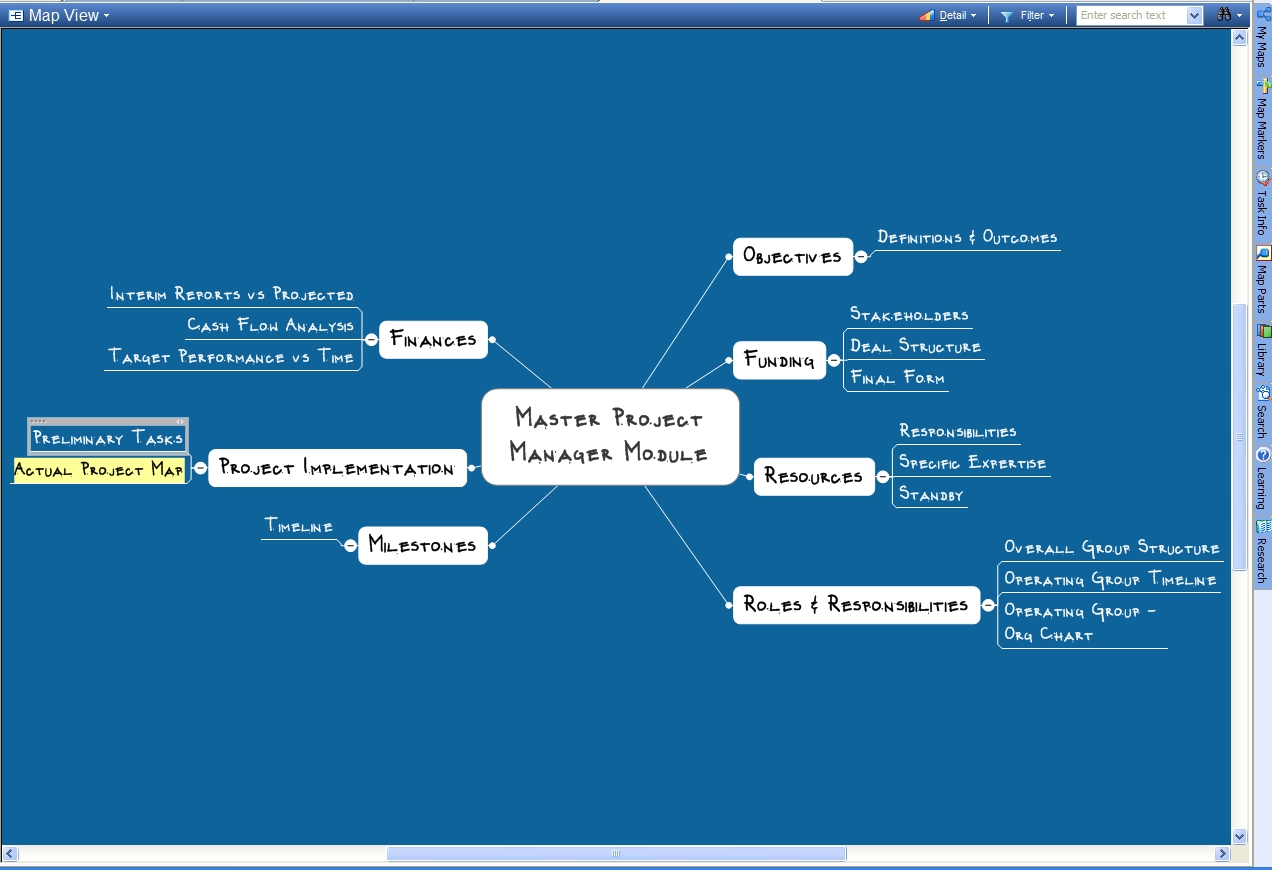
We are ready to embark on a major project and I realized that much information and design was scattered on many docs, spreadsheets, pdf's, and maps ... what to do to help being not overwhelmed as the project moves forward ... I have uncovered many sources of nuts and bolts for managing projects and have all the software, but I keep coming back to the flexibility of a mind map ... read a great article on using maps to manage by INNOVATIONtools that gave me the kernel I needed to think this through in my situation ... (I got there by looking on a great resource site ... The Mind Mapping Software Weblog ) ... taking this idea and creating a framework suited to my situation I have come up with what I call my Master Project Manager Module for lack of a better title ... this map will be my container for all the bits and pieces that go into assembling a project and getting it going. Along the way there are numerous resources and ideas that can be thrown into the mix and kept for ready reference or having a plan B when things go wrong. Importantly, all the information is then on ONE map for quick focus ... as the work progresses to the final project implementation, the map will also serve as an archive to all that went into it. Valuable is the ability to bore down on a task or item or looking at the big picture by expanding all items ... you can have as much granularity as you like and still maintain the ability to grasp the big picture .... this is the beginning framework ... I will post more as the concept gets fleshed out and put to use ....

Thursday, April 20, 2006

Mind Map Meeting Presentation ...


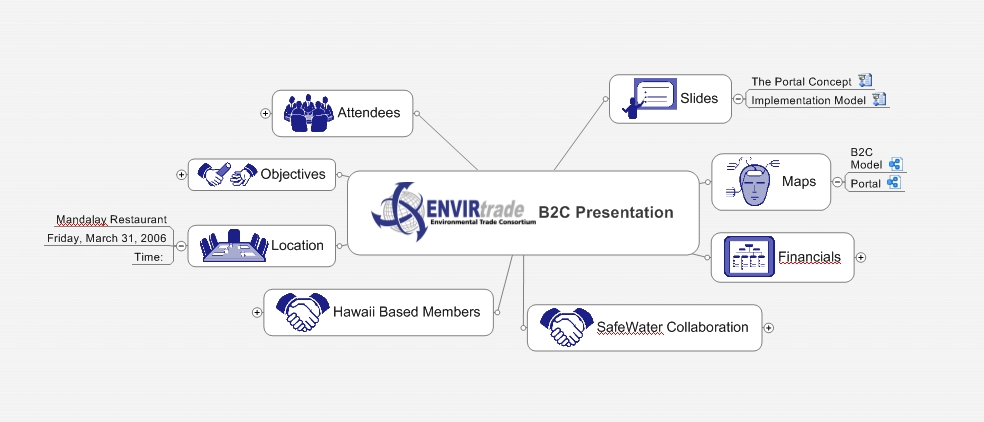
I have just returned from a critical meeting and used mind maps to convey a tremendously complicated situation and information rich presentation to a very important partner. As you can see the varied topics of discussion it is an extraordinary amount of information to be conveyed ... Look closely at the map and you will see links to other maps ... there were a total of six submaps in the presentation that branched from here and from the subs. I was able to let information and proposals distill from the main map down to the specifics of each. There were also links to spreadsheets, pdf files, docs and pics ... all included in this one sheet ...

The presentation showed the value of this method ... this was a one on one meeting that more or less created a face to face environment to an associate that we had been courting for years and we are finally ready to move forward on a project ... I tried here to create a general framework and flow as we had only a few hours ...

Real world 101 ... I laid everything out meticulously and printed out each map and supporting document and assembled them in a folder to create hard copy, I kept the tablet with me and loaded both mindmanager and gobinder ... I took notes in gobinder as the meeting went on and wrote down notes ( more on this in a later posting ) ... the value of doing things this way was that I let my partner talk first and he actually fleshed out several concepts that were covered in the map, so I showed him the reference and he immediately got the concept as I had fleshed it out ... seeing the picture of the specific in context of the overall flow is an incredibly empowering tool for discussions ... it allows you to immediately convey direction and focus and it gets your ideas and points out in a quickly digested format ... as the discussions continued several more references were fleshed out in other maps that I had printed and we quickly came to agreement and created a process to go forward (which I incidentally mapped on the plane trip back). I could not work without using the mindmapping tool anymore ... it gives you a tightness and focus that cannot be done with any other means ... I could have used the tablet PC to supplement, but just having the printouts to scratch on by both of us was incredibly valuable ....

Thursday, April 13, 2006

Great Product, Great Service ....

I am about to go on a quick trip and always tweaking the "mobile" configuration of my machine ... a wonderful Motion Computing M1400 ... there are a couple concerns and annoyances when I travel and just happened to be reminded of a product I had seen a while ago. I had bookmarked the SlateGlove site and went back to it ... let me tell you, from the word go, they were super responsive on the order and were willing to go the extra mile ... very refreshing in this day and age. I am in Hawaii and most shipping calculators do not do the charge correctly, so they worked with me to get it done at a more reasonable cost and they got it out that day !!!!!

Let me digress to tell you what the problems are for me ... I travel with a thinkoutside bluetooth keyboard and always have the problem of how to support the unit ... I have travelled extensively and was using the old plastic motion stand that I got with my first machine ... not elegant, but served its purpose ... when I saw the website, I immediately had to order the unit as it would support the tablet on a table both in landscape and portrait ... problem no 1 solved. Second problem, I carry the tablet in a top loading briefcase and am always gingerly first finding the grip and then applying a "death" grip so as not to drop the unit ... the SlateGlove gives me a secure surface on the back of the machine to grab comfortably ... prob no 2 gone.

There are many obvious things if you go to the website that the attachment will do, including a much better way of holding the slate securely ... ie, probably where they got the name ... the product does not interfere with docking or battery changeout, so it is a wonderful solution for a Motion owner (have all models now including the LE1600 - no 800) ... The workmanship is superb and documentation is detailed and thoughtful ... I really like attention to detail, and let me end with a little something that blew me away ... you install the unit by taking two case screws out and adding on the nicely designed tapered unit that will fit snugly into the case holes ... we in the hinge section is a machined spot to put the original case screws so they will not be lost when you take the unit off ... that attention to detail is indicative of this product ... highly recommended product and company behind it ....

Tuesday, April 11, 2006

Quick Daily Take on the World ...


My daughter had an interesting assignment in a creative writing class recently ... the proposition was the ubiquitious nature of advertising of which a case was to be made pro or con .... she threw it out for discussion to which I replied ...

"Ubiquity can help one to implement selective focus… you learn from the constant and ubiquitous stream to discern importance and to focus on relevant and consequential products, services and ideas… in the older days, you would be wowed and that was that, mission accomplished… now because everything is WOW… one must learn to discern… that is not only helpful but can serve to create a better flow to life in a modern society where knowledge is everywhere, but wisdom is learned."

This led to an extremely lively discussion and a great paper (if anyone would like to read it, email me and I will send you a copy), which leads to today's post ... how to selectively bombard yourself to benefit from the ubiquity of information and yet not get overloaded to create brain lock .... here is my working flow (please use this as a beginning and modify to your own purposes as this is an individual pursuit) ...

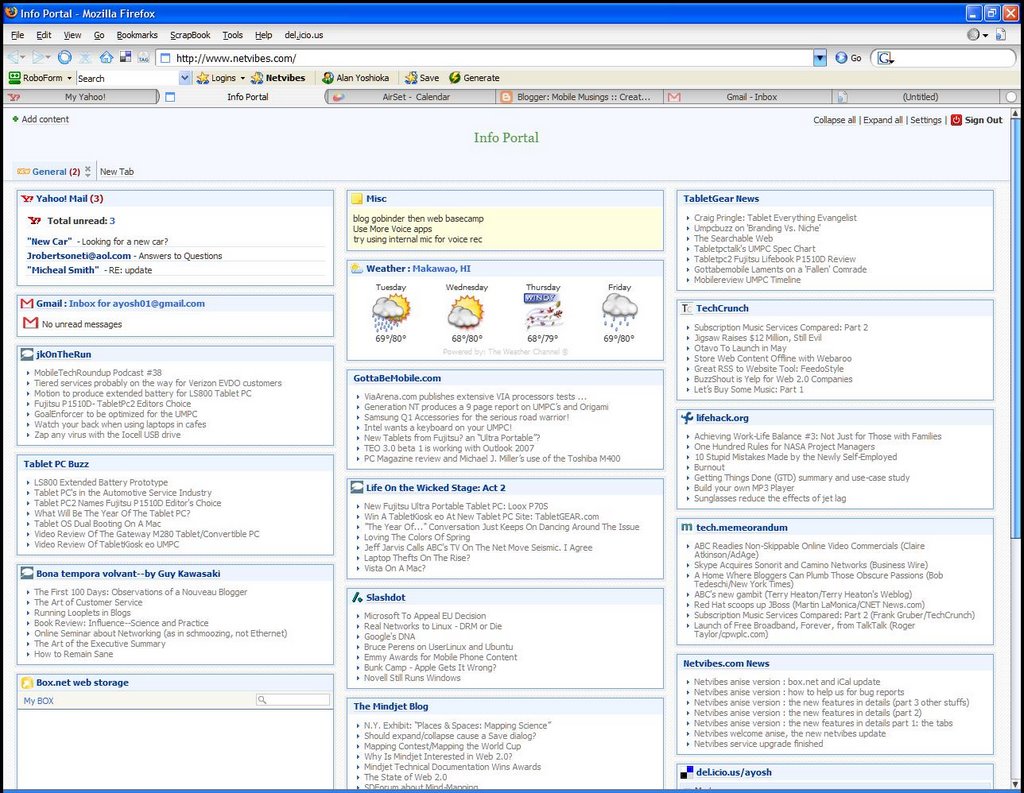
Here is a shot of my Netvibes page I have found this is my basic sieve as I take what I consider to be good providers of information and it highlights for me any new articles that are unread ... from there I can simply click on any article and then I normally hit the read all button to then move all the articles to the read status ... this gives me an extremely fast way of scanning the feed but yet enables a much deeper read if I want (just another window away) ... then I will bookmark to del.icio.us the page with cross references for future digestion and deeper meaning. The page also provides a quick glance at my yahoo and gmail boxes, a little note section, and weather forecast for Makawao, Maui (pretty brutal lately). This one page gives me the quick view I enjoy to start my day and provides VALUABLE information as it occurs ... one area especially useful is the mindjet blog that has on more than one occasion given me helpful maps to work on and great papers for thinking. I like to read as much as I can, but because that can be spotty as far as time goes, this gives me a quick start whenever I can sneak a peak ... there is a new feature that I am going to use on the road next week to try and that is the boxnet storage ... file storage on the page gives me access to key files like the yahoo briefcase .... could be very handy ....

Monday, April 10, 2006

To Synch is Divine ....

In the last week or so I went back to one of my old friends ... GoBinder the 2006 iteration ... after repeated forays into other methods of taking notes on my trusty Motion m1400 tablet PC, I keep coming back. I will go into a more in depth use of GoBinder in a later post, but let me go into the particulars of what I have now that works great for me.

I use Outlook as my hub as it seems most applications have some sort of synch capability with Outlook. Not to disapointed, there is a great mobilizer built into GoBinder that handles my critical apps ... Contacts with copious notes and Appointments on the calendar .. I use the notes function on the Contact screens to create contemporaneous notes of conversations or critical pieces of information that are tied to the contact. These are critical to my work flow and I need to insure that all is well and updated ...

I also use Airset on my desktop always opened in a browser window as I find that using the airset application is actually faster and easier to use than loading Outlook and hogging all the resources necessary. Airset allows me to enter appointments and notes and other information in an incredibly quick and efficient way ... So what I do is use either GoBinder or Airset to enter information and synch to Outlook functioning as a hub of sorts ... works for me ....

I will follow this in the next day or so with the features of the new GoBinder and why I have chosen this over the other numerous note taking choices ....

Sunday, April 09, 2006

Another Quick Business Application of Maps ...


Yesterday during a long conference call it was determined that I had to meet with a partner in Seattle in a weeks time. The meeting was to discuss various items including some immediate collabortations and long term planning. Normally a meeting of this nature would tend to ramble because of the breadth of discussions and needs of the two parties.

This is how I prepare and plan for meetings and trips by utilizing the tools and techniques that I have been talking about here. The sample of the map was done in 30 minutes this morning as I was gathering my thoughts ... you can see that already I have linked two other maps (for illustrative purposes dealing with strategic vision and specific future proposals), powerpoint show (use the show, you need to save the presentation as a show, and you will go right through the presentation and return to the map), and a word document ... all of these give you the supporting information. By trip time, there will probably be dozens of attachments, this is to give you all your resources in one place, no more fumbling or searching. This is the key concept here, you take any and all pieces of information that you MAY need and logically put them into areas of discussion. If you go there and need these things, you are a click away .. if you don't it just looks cool ...

I do all my meetings this way and find it invaluable. By preprocessing what may happen, you are much more prepared for the twists and turns that happen in meetings like this. When you use it to create an agenda, you ensure a TIGHT presentation with the ability to fill in info as needed ... once you try this, you will never go back ....

Friday, April 07, 2006

Evolution of the Map


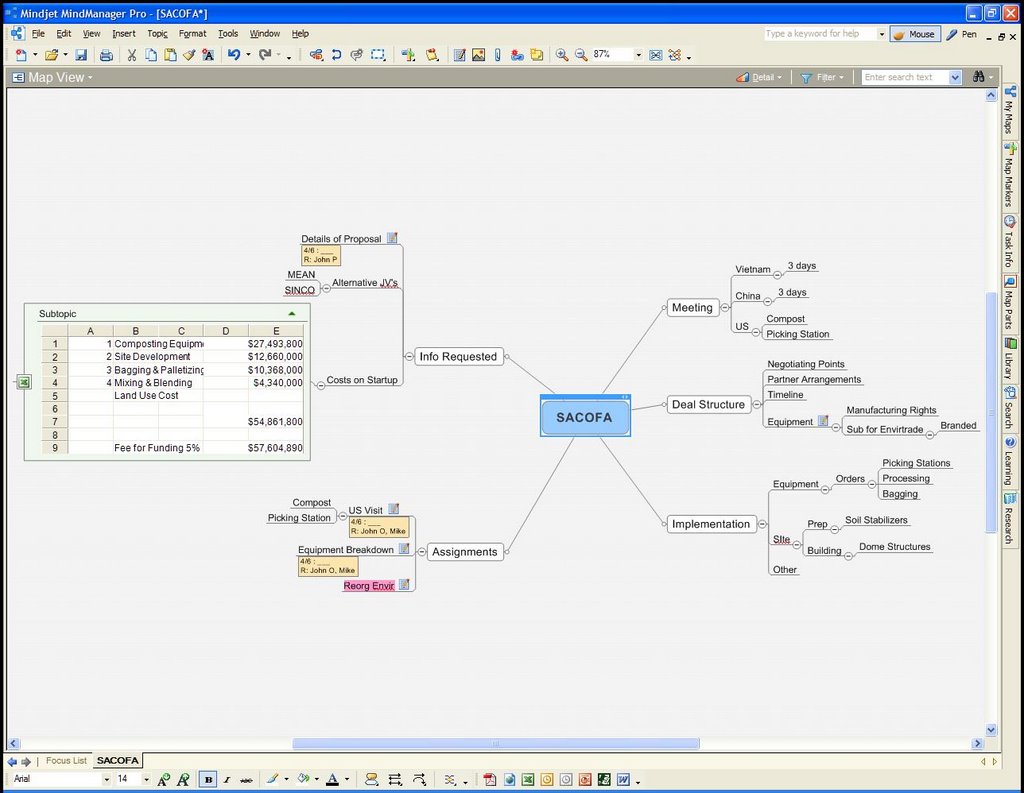
I thought it would be instructive to show you how the map evolves to manage the project. The new figure shows the inclusion of a spreadsheet that is actually linked to our main project submission and contains key elements that are cross linked to working estimates. This dynamic spreadsheet window gives me key numbers used in negotiating that will be up to date and easily modified. Also shown here are the dates and resource use as entered in the task pane ... I use the dates to give me not only deadlines, but aging as required with the specific item. The resource field gives me a way to keep tabs on all the items that are assigned to different members at each juncture. An extremely valuable adjunct is the ability to craft a negotiating stance based on the project being fleshed out ... at a glance using this technique and also highlighting with color it enables you to quickly realize what is a give up and what is critical in a negotiating meeting. All of your details and documentation can be carried by linking key docs and sheets and even presentations to this one map portal as I like to call them ...

I will post later how I tie in the GoBinder inking solution to meetings as I print this map to an ink document to carry into meetings ... and how all the tasks and scheduling are handled in GoBinder linked to Airset via Outlook ....

Thursday, April 06, 2006

Practical Project Management


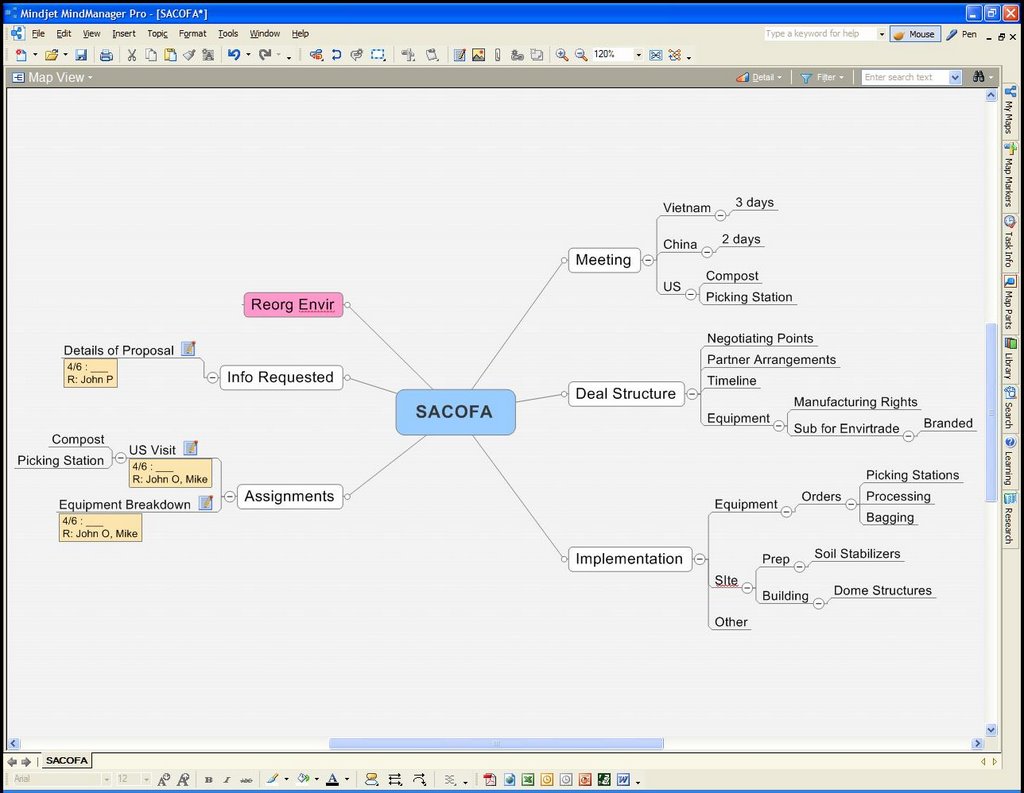
or How to Keep Your Sanity in the Information Age .... as I toil through multiple projects all with a sense of urgency, my methods for managing the tasks, information, resources and people are constantly evolving, but I seem to have hit a sweetspot in the tools that I use ... I think the obvious beginning is at the hub of my projects and for that I use MindManager, time and time again it has allowed quick and ultimately useful sketching out of the idea and what needs to be done, it then evolves into the repository of communications and tasks. I use the note feature to cut and paste emails and random information into a particular topic. I use the task feature to show me the start dates and finish dates to items, this is particularly helpful when you use it as an aging system to see how long a particular item has been going. It becomes easy then to have a simple archive node that serves as your done folder, I take a finished item and simply move it to archive, so you never lose anything that is finished and it does not clutter up the main map. The example I have here is a project that needs many loose ends followed up on and details to be taken care of using other resources and people along with key analysis that must be done once the info is gathered ... did this in less than an hour this morning and have sent out emails, etc based on this ... as the project unfolds, detail is added and things such as spreadsheets and documents are attached to this screen to serve as the project hub ... more to follow on the use of gobinder and the web to complement this ....

Friday, March 24, 2006

Using MindManager to create an integrated presentation...


For the last few days I have been preparing for a meeting next week ... I noticed a couple of templates and ideas on the Mindjet web site and downloaded some examples ... one of them showed how to use powerpoints within the app ... well I decided to use this idea and others and created what you see here. The basic idea is that I bring up this map and use it as the hub of the presentation. I have links to other maps, two powerpoints that when clicked, take me right into a full screen show based on other maps ... the links to the other maps bring in another whole round of ideas that can be used to take more and more detail into the conversation as needed ... you can add offshoots to give as much granularity as needed, but yet leave the hub to give you a sense of the full presentation ... it is more of a meeting, so I don't really want to dictate the direction of the presentation, but rather be prepared to go in any direction ... by using a mind map, you have that available ... I really like this and can see how it would be valuable even in a much larger presentation as you would be able to change direction at any time as the discussion dictates ... how many times have you been locked into a powerpoint and you realize that most in the room are not interested ... here is a great presentation tool that can change your ability to deliver your message ....

Saturday, March 18, 2006

Update on Portable Apps ...

Got all things running and this is really a slick way to carry a bare bones office with you that will fit in a pocket ...

Hardware: a Seagate 5gb pocket hard drive ... they are all over ebay now and come in 2.5, 5 and 6 gig configurations (I am trying to get a second unit as we speak ... ) - depending on your needs and which software you choose to load, the new larger flash drives will also allow you to carry a large amount of data with you on a key drive

Software: the Mozilla open source email and browser (Firefox and Thunderbird) tweaked to boot off the pocket drive ... add the OpenOffice office suite from the same location to have all your office tools and finally, Microsoft's free SyncToy application

How it all works: the portable apps are all just like the standalone units on your regular desktop. The portable apps will show in their respective folder (a further app is a launcher available at the same site ...) and you just click to launch ... the great thing is that they are running on the flash drive so you can take your settings and bookmarks and ??? as if you were still on your own computer AND it will not leave any traces on the host machine - especially critical when using machines in public places and in strange locales. I use the sync toy by creating a data folder on my pc and just stuffing any and all docs, pdf, spreadsheets, power points, etc that may be needed on a portable basis (actually have my paperport directory and current working folder in this main folder. By using the sync toy on this folder before I go out the door, as I leave I will have everything up to date and current ... as you change docs or even put new ones in on the road, all you have to do is sync again when you return and your data is current again on both the drive and you main machine ... this is a simple and very effective way to carry a minimal but workable "computer" with you ....

Friday, March 17, 2006

MindManager more useful everyday ...


I have been a longtime MindManager user .. in fact, I have several of these type of programs installed on my machine but keep coming back to this as my most useful app. I have used this program for managing an extensive portfolio of projects all in different stages ... I utilize the program in a different way from most methods that I have seen for managing information ... let me go through the thought process ....

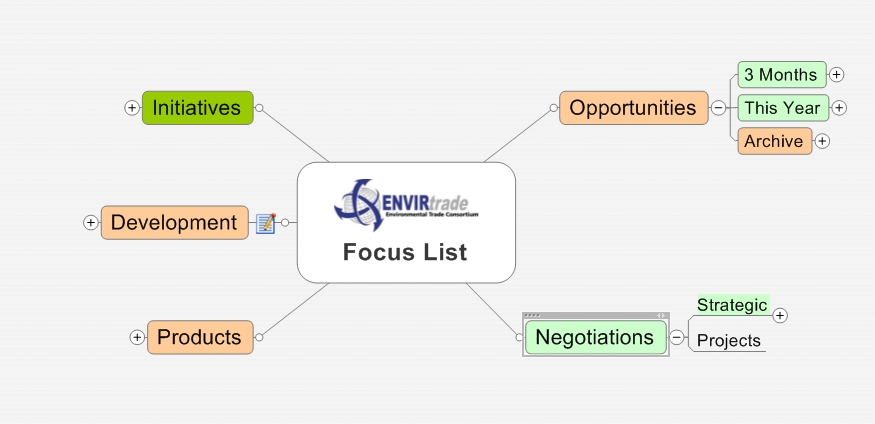
I need to focus on opportunities based on location and time, so the opportunities section is divided into prospects that are close or within the year ... further I have an archive section that is used for missed opportunities or those that are on hold ... that way attention need not be paid there on a daily scan but when time permits ... the other side of the map is for task based items like negotiations, meetings, product development, etc .... I use color on the sections throughout to key whether things need attention or are immenent ...

Now here is one of the items that I could not live without ... since a lot of our projects are all over the world, the info comes in as a steady flow throught emails and attachments ... I use individual subsections each time a significant point happens in a project, so you can burrow down based on the chronology ... I use the note feature and copy and paste email info into the notes, so when I need to refer back for info, it is available right on the branch, no more searching for info ... I then have files, etc all linked to the branch, so it becomes a self contained project overview ... an added ability is resource management and time elapsed, I use the task info to show assigned resources and also I will put a start date to shown when we started and a finish if we have certain time constraints on a branch ... makes for a wonderful map that you can see everything and in as much detail as you need or just stare at the big picture ... works for me ....

Sunday, March 12, 2006

Portable office to go ....

I have been searching for a good way to use my portable USB drives, both flash and hard ... there has been lots of press on using apps with the new U3 standard that is being included with several new flash drives ... I like the idea, but paying for that is not something I would normally do ... so I kept searching and found a great site ... PortableApps which has open source applications like OpenOffice, firefox and thunderbird that are tweaked to install and run off the drives ... perfect ... you could load your data files and have the openoffice, plug into any usb while at a friends or cafe and voila, you are up and working. It will also take your settings from firefox, etc so you are right at home while not being at home ... great stuff ...

Saturday, March 11, 2006

Web based office .... becoming a reality ...

It was just announced that writely was bought out by Google and this made sense in the scheme of things that would all work on office files and be online ... well, keeping in that vein, here are several more that bear watching and really make a handy desktop for you while on the road ...

Word Processor ... Writely makes seamless docs and can write to pdf for universal rendering ...

Spreadsheet ... Numsum and iRows are both good ... very quick and will allow you to share the data as needed

Power Point ... Thumbstacks has just emerged and is a good choice for that application

Database ... DabbleDB is almost ready, so sign up for notification ...

Calculator and Converter ... CalCoolate is a quick and handy calculator and converter

This together makes quite a nice assortment of business and personal tools that one could use anywhere with a web connection ... comes in handy in a pinch or for collaborative work ... could also be used to present things right from a clients pc ... uses are only contstrained by your ingenuity ... play and enjoy ...

Wednesday, March 08, 2006

Better screen capture ...


Here is a better screen capture of my "brain" ....

Extending the mind by using the Brain ....


Hmmm .... did that get your attention ... good, I have been using this extension of the thought process to help with memory and projects for several years now and thought I would share my use and point you to the download for you to try it for yourself ....

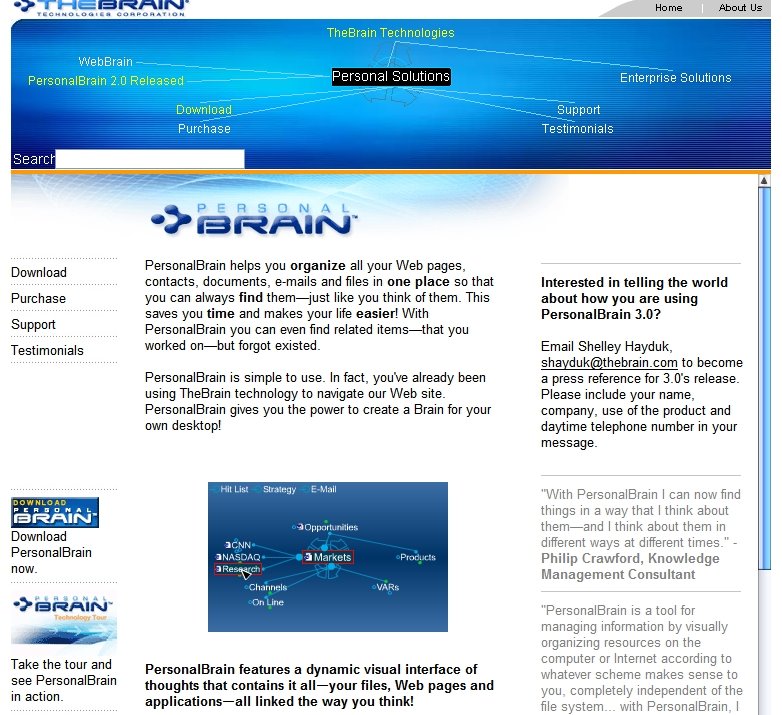
When I am working on projects, it seems like good ideas pass through the mind quickly and if not noted or followed will end up in the old recycle bin in the sky ... well enter the Brain it is a neat app that stays loaded and accessible at a moments notice on my screen .... it tries to mimic the thought collection process in your mind ... it creates a complex web of interconnected things like thoughts that can be gotten within a few clicks of the mouse. I use it to put all relevant links to web sites, documents, thoughts, etc into a labled area that can be connected easily to other areas to show relationships and thought processes ... I have included a clip of their website that illustrates at the very top a "plex" or their parlance for a brain or collection (you can have multiple brains) but I prefer having all thoughts in one place. You can see the interconnections, click on one and the plex transforms itself to key in on that "thought" ... I love the interface and how you can quickly navigate your thinking and saved thoughts ... I like to compartmentalize all links and that way can quickly come back to a project and be at speed, that is considering all the files and links that I usually have when putting together a project ... this save an enormous amount of work when you try and reconstruct your path ...

Learning curve can be high on this one, but I think it worth an exploration if you have the inclination ... I tend to leave it and come back regularly as old thoughts never die in that little portion of cyberspace ....

Monday, March 06, 2006

Desktop Setup ... Tablet PC and Monitor ....

Discovered today a super neat way of finally harnessing the power of the tablet PC while at my desk and not being tied to the smaller screen (for all you vision challenged gen x'ers ), I have been using a flexdock for my Motion 1400 and a 19" monitor at a 1280 X 1078 resolution so I would have more real estate to work in ... that is a great setup, EXCEPT when you want to ink something ... well, watch carefully now and I will show you how to do nicely ...

There is a way to mirror or run an extended desktop to run two monitors from the intel graphics card that is in the unit. The problem is that the resolution cannot be set independently so a compromise is always made. Enter UtlraMon by Realtime Soft ... this totally slick app takes your monitor and allows you to use both as if you had two separate operating areas ... it even allows you to have the task bar spanning both screens and will have the programs running on the respective screens in that task bar (unbelievable) ... you can do all sorts of things with it (see the feature section) but the main thing for me is running my large monitor in the higher res and allowing me to ink if I need to ... I have the Motion set up in the flex dock to the left of my 19" monitor .. it is normally set upright, but when I need to ink, it can lay down for a nice inking surface ... too neat ... I have been trying all sorts of combinations to try and allow me to do this, now it is happening with this setup ... you can even run more monitors to really go crazy, but two is enough for me ... anything to add to productivity ... I actually have Thunderbird email client running on my tablet while running Firefox on the monitor ... makes for a really quick way of working ... the cursor smoothly passes between screens, so it seems very natural to work this way ... just did this and am exploring ... try it, it is amazing ...

Sunday, March 05, 2006

New Toshiba business site for Tablet PC ...

Great new page that is devoted to Tablet PC's by Toshiba .. lots of good stuff and ideas ... the marketing is getting more aggressive and the uses are expanding .... just what we need to spread the word on Tablet PC's and their utility .... a good read and site to watch ... Toshiba also highlights their 4 offerings ... convertibles all, but seems like capable choices to look at ...

Thursday, March 02, 2006

It Works ....

As a closing post to the process of creating quick web sites, this should do it ... I created a site from scratch today and have it out for review in a lot less time than I have ever been able to do it in. The reposting and changing of information is virtually instantaneous, so another added plus. Again, the application is basically using the Bubbler Instant Publisher application and the Bubbler hosting ... they have been extremely responsive to emails for help and even went above and beyond help by giving me an image of my page so we can use it in a presentation ... refreshing to get such great service ... highly recommended group ...

The second key is the tablet PC app from Micrsoft called the snipping tool and it is part of the Experience Pack for tablet PC's. The snipping tool is really a slick capture tool that will save in jpg and allow you then to take it into a word doc for final additons and editing ... I then use it again to take the layout from my work doc and create a simple and single jpg that you can see posted in the photo sections of the site ... really fast and handy ...

So here is a link to my site produced today using these tools ... gotta love it !!!

Tuesday, February 28, 2006

Putting it all together ...


I actually put the finishing touches on the work today and finishing the chapters that I started here ... the work has gone well and the finished product is as I imagined ... the included jpg shows the result of taking the Open Office draw and making a diagram, then clipping it into word along with a jpg of the equipment ... then the really trick and thing that makes it all come together ... I took the clipping tool to the word doc and exported it to the jpg that you see here .... really a fast and clean way of creating a brochure or handout that is clean and not really alterable like a doc or open pdf file ... this is important in business applications.

The speed of the updating of the website makes the bubbler solution incredibly useful. The combination of these tools takes this sort of work to a new level of utility ... I have been looking for this ability for awhile ... this is a great combination ... see the older blog entries for earlier attempts ....

Monday, February 27, 2006

A Neat Solution ....


Once I created the website (which is nearing final form), I needed to upload some graphics ... the problem of melding a photo with drawn diagrams to show a model is one that I have been trying to figure out for a long time. I think I got it ... let me share the process ...

I downloaded OpenOffice as it has a very good drawing module, once there I created my 2D drawing representing an addition to an existing piece of equipment .... now you have a choice once this is done ... you can save it to a word doc and import the pic there (the elements can be further moved in the document) or you can import right into the draw page ... regardless of what you decide to do (the word would give you the ability to add notes and discussion to the photo) ... the secret is in the last step.

I have the Micosoft snipping tool for the tablet PC (that is how I got the screen captures from earlier posts) .. once there I set it for rectangular area and just highlighted the drawing along with the photo .... great results and very quick and easy ....